May 7, 2012 -- Research In Motion (RIM) today launched BlackBerry® Screen Reader, a free software application that helps customers who are blind or visually impaired operate their BlackBerry® smartphone.
BlackBerry Screen Reader provides an audible output based on visual information displayed on a BlackBerry smartphone.
“We are excited to introduce BlackBerry Screen Reader as part of our suite of accessibility solutions for BlackBerry smartphones,” said Greg Fields, Senior Product Manager. “BlackBerry Screen Reader helps customers with visual impairments stay connected with the people and information that matter most to them, and is representative of RIM’s continuing commitment to support customers with disabilities.”
Key features of BlackBerry Screen Reader include:
Support for core applications – Users can easily access core BlackBerry applications including email, calendar, phone calls and more.
Speech settings – users can customize the text-to-speech settings (volume, pitch and speech rate) and preferences for punctuation, verbosity and password security.
Keyboard shortcuts – Users can set speech and audio preferences quickly and easily through (physical) keyboard shortcuts
Accessible documentation – User Guide available in accessible HTML through a desktop web browser.
BlackBerry Screen Reader is available now as a free download from www.blackberry.com/screenreader for the BlackBerry® Curve(TM) 9350, 9360 and 9370 smartphones. The application is available in English, French, Italian, German and Spanish.
For information about BlackBerry accessibility solutions for customers with disabilities, visit www.blackberry.com/accessibility.
Using only her thoughts, a Massachusetts woman paralyzed for 15 years directed a robotic arm to pick up a bottle of coffee and bring it to her lips, researchers report in the latest advance in harnessing brain waves to help persons with disabilities.
Using a robot arm, 'Cathy' was able to lift a bottle and drink for the first time in 15 years. (Photo credit: Braingate2.org)
In the past year, similar stories have included a quadriplegic man in Pennsylvania who made a robotic arm give a high-five and stroke his girlfriend’s hand, and a partially paralyzed man who remotely controlled a small robot that scooted around in a Swiss lab.
It’s startling stuff. But will the experimental brain-controlled technology ever help paralyzed people in everyday life?
Experts in the technology and in rehabilitation medicine say they are optimistic that it will, once technology improves and the cost comes down.
The latest report, which was published online Wednesday in the journal Nature, comes from scientists at Brown University, the Providence VA Medical Center in Rhode Island, Harvard Medical School and elsewhere.
It describes how two people who lost use of their arms and legs because of strokes years before were able to control free-standing robotic arms with the help of a tiny sensor implanted in their brains.
The sensor, about the size of a baby aspirin, eavesdropped on the electrical activity of a few dozen brain cells as the study participants imagined moving their arms. The chip then sent signals to a computer, which translated them into commands to the robotic arms.
The computer was taught how to interpret the brain patterns through practice as participants with disabilities watched the robot arms move and then imagined that they were moving their own arms the same way.
In one task to test the system, the two participants tried to direct a robot arm to reach out and squeeze foam balls in front of them. The man succeeded in less than half his attempts, but the woman was able to do it about 60 percent of the time.
The woman, Cathy Hutchinson of East Taunton, Mass., was also asked to use the arm to drink the coffee. That involved picking up the bottle, bringing it to her lips so she could sip from a straw, and putting the bottle back on the table. She succeeded in four out of six tries with the arm, which was specially programmed for this task.
“The smile on her face … was just a wonderful thing to see,” said Dr. Leigh Hochberg, a researcher with the Providence VA, Brown and Massachusetts General Hospital.
Researchers said in Hutchinson’s case that the results show that the implanted chip still worked after five years, and that her brain was still generating useful signals even though she hadn’t moved her arms in almost 15 years.
The ultimate goal, researchers said, is an implanted device that would reactivate a person’s own paralyzed limbs. Another goal is to operate high-tech prostheses for amputees.
Andrew Schwartz, who is doing similar research at the University of Pittsburgh, said the coffee-sipping was encouraging because it represents an everyday task a paralyzed person might want to do. “I think it’s showing this technology has therapeutic potential,” he said.
“The field is rapidly advancing, and I think this offers hope for people who are paralyzed,” Schwartz said. “The types of movements we’ll be able to do are getting more and more sophisticated at a rapid pace.”
But he and others said the technology faces a number of hurdles to widespread use, like reducing its high cost, making it more reliable, and refining the technology. For example, the brain implant now sends signals out with a wire through the skull, and researchers want to develop a completely implanted version that communicates wirelessly.
Another step toward wide use will be enticing companies to invest the money to make commercial products. Just when that might happen is an open question, Schwartz said, but it could be in the next couple of years, with prostheses or free-standing robotic arms on the market a few years after that.
Dr. Bruce Gans, executive vice president and chief medical officer of the Kessler Institute for Rehabilitation in West Orange, N.J., said the technology is too expensive now for widespread use. But if brain control finds uses outside the relatively limited market of paralyzed people, that might drive improvements in technology and dramatically reduce the cost, he said.
Gans suggested other uses might involve industrial applications; neuroscientist Andrew Jackson of Newcastle University in England suggested it might be in rehabilitation for victims of less severe strokes.
At some point, Gans said, “It may even turn into something that allows a person with paralysis to go back to work, so it becomes a tool a vocational rehabilitation program could eventually endorse and support.”
Dr. Preeti Raghavan, an expert in physical rehabilitation of the arms and hands at the New York University Langone Medical Center, noted that the cost of the technology would be weighed against the significant expense of caregiving for paralyzed people who can’t do much on their own.
She said she expected that within a decade, many people may be using the technology to control their own limbs or robotic arms. Gans said that wider use of robotic arms might be feasible within five years, but that reactivating paralyzed limbs could be decades away.
The latest version of Apple's iOS system for iPhones and iPads includes Siri, a powerful speech recognition and assistance feature. With Siri you can control your device by voice as well as dictate content and ask questions in natural language. Siri may engage you in a dialogue to clarify what you're after, then follow through as the context and your commands indicate. Here's a video of it, showing different users, including one who is blind.
RoboBraille is an email service which will convert digital text documents into either Braille or audio files. You can email or use the web to give them your file and the system will give you a document that is either an audio file or Braille file. Your file can be a .doc, .docx, .pdf, .txt, .xml, .html, .htm, .rtf, .epub, .mobi, .tiff, .tif, .gif, .jpg, .bmp, .pcx, .dcx, .j2k, .jp2, .jpx, .djv and .asc file. The file they send back can be mp3 audio, Daisy full text and audio, e-Book, document conversion, or Braille. For the audio files, you can choose 12 languages other than English, as well. While it is a computer generated voice, the speech is very high quality and is fairly engaging. It takes a day to get your file.
The inventors were honored with a 2010 BETTS Award. The system is being funded in Europe and users can make contributions. It is free to individuals and commercial users pay a licencing fee.
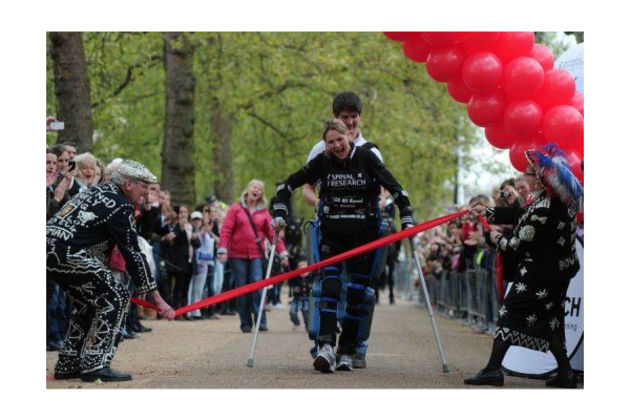
A paralyzed British woman made history on Tuesday, when she became the first person to ever complete a marathon while wearing a bionic suit. Claire Lomas, 32, finished the 26.2-mile race 16 days after it began, with the help of the ReWalk exoskeleton developed by Amit Goffer.
Lomas was left paralyzed from the chest down following a 2007 horse riding accident that broke her neck, back, and ribs. In the five years since her accident, she's gone skydiving, learned to monoski, and has returned to horse riding. In January, she received a £43,000 ($69,400) ReWalk suit on loan and set her sights on last month's marathon, in the hopes of raising money for Spinal Research — a charity that funds research on paralysis caused by back and neck... Continue reading…
AppleVis is a website by and for blind and vision-impaired users of Apple devices, primarily iOS device users but including some resources for Mac OS X users. The focus is on VoiceOver users but there are some resources for other blind users who use zooming to access devices too.
A community-powered website for blind and vision-impaired users of Apple devices.
Seek and share information on the accessibility of apps developed for the iPhone, iPad, iPod Touch and the Mac.
Read and share guides, tutorials and tips to help VoiceOver users get the most from their Apple devices.
AppleVis is a site which provides many resources, including:
Directories of iOS and Mac applications with community-provided descriptions and thorough VoiceOver compatibility information for each program. Applications recommended as highly usable by blind users are also collected together in “Recommended App” lists.
A forum for discussing issues related to accessibility for Apple users.
AppleVis blog which highlights news of special interest and editor opinions.
Podcasts with walk-through style tutorials and reviews.
Guides section offers text tutorials
Reviews of accessibilities
Lots of stuff! Most is fairly high quality too, the moderators must work overtime there. This site is highly recommended for those interested in resources for vision-impaired Apple users.
Becoming a mouse-avoiding keyboard junkie is a learnable skill; it requires practice and memorization—especially muscle memory. Everyone knows a few keyboard shortcuts (like Command-P for print, or Command-Q for quit). Mastering more, along with other efficient ways to control your Mac without reaching for the mouse, will help you get your work done faster, leaving more time for Angry Birds.
This MacWorld article is aimed at able-bodied people who prefer to use the keyboard mostly, instead of the mouse, because it’s quicker … but of course this means it applies well to keyboard-only users and to switch users and voice users who find keyboard commands easier than mouse movement commands.
Do you know somebody else who would find this interesting or useful? Please forward it to them.
Did somebody forward this post to you? Visit ATMac and subscribe to receive these posts for free!
This article was originally published at How to use your Mac without a mouse and is copyright (C) Ricky Buchanan 2012. May be forwarded but do not republish without permission.