Thursday, March 19, 2015

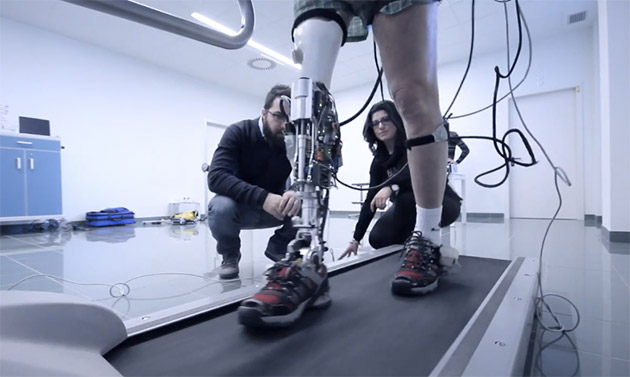
Cyberlegs project wants to equip amputees with robotic limbs

You'll see a lot more instances of robotic arms in the news, but it doesn't mean high-tech prostheses for the lower limbs don't exist. The Cyberlegs project, for instance, is developing robotic legs that can help amputees move and walk more naturally. Each system is comprised of smart shoes equipped with pressure sensors and inertial measurement units, the limb itself, as well as a component and algorithm that can decode how the user intends to move. It can, for instance, tell if the user wants to start walking, to get up or to sit down -- based on the amputee's habits -- providing the proper support for each action. Users that need even more help can also be fitted with an accompanying pelvic brace that can assist them in moving their hips.
Cyberlegs is a joint project by a number of European institutions: the University of Ljubljana in Slovenia, Scuola Superiore Sant'Anna di Pisa, Fondazione Don Carlo Gnocchi Onlus in Florence, as well the Catholic University of Louvain and the Free University of Brussels in Belgium. Researchers from these schools have been working on the project since 2012 using $2.7 million in funds from the European Commission, but the Italian scientists have only just presented their work to the public this Monday.
Thus far, the system has already been tested by 11 people. But when the team got together recently to assess their work, they've determined that they still need to reduce the prosthetic's weight and size for comfort. The team is hoping to get additional funds from industrial partners to make that happen and to bring Cyberlegs to market in two to three years' time.


High-tech glove could help the deaf-blind send text messages


In German-speaking countries, deaf-blind people use a "tactile alphabet" called Lorm to communicate with one another, which involves a series of motions on the hand.
The problem with Lorm, though, is that few people understand it. This means that people who are both deaf and blind are often limited to communicating with others who understand Lorm.
But a new technology aims to help them communicate more easily with people who don't understand Lorm. Researchers in Berlin are developing the Mobile Lorm Glove, with which deaf-blind people can transmit Lorm to text on a computer or mobile device.
A deaf-blind person can run her fingers across sensors on the glove's palm, just as she would on a normal hand. The sensors pick up on the Lorm and then translate those tactile motions into text. The communication is then sent as a text message to the receiver's smartphone, for example. The transmission occurs via Bluetooth. 
glove-thumb
IMAGE: DESIGN RESEARCH LAB
Conversely, the receiver can then send a message back to the glove. 
It w
It works just like a normal text message, but there are small vibrating motors on the back of the glove. The text is then translated in Lorm and communicated via vibrations.
The Mobile Lorm Glove could allow deaf-blind people to make more connections and communicate with more than one person at a time. 
The glove is still a prototype but has already had practical applications in the real world.
“I can send and receive — it’s easy,” Edi Haug, a deaf-blind man, told the BBC through the glove's translations. 

Friday, March 13, 2015

Apple Watch May Include Accessibility Features for Blind and Low Vision Users

According to a 9to5Mac article detailing the leaked Apple Watch companion app, Apple Watch is rumored to include a certain level of VoiceOver support, as well as a number of other accessibility features:

  • Like Apple’s other products, Apple Watch will have a series of key accessibility features.
  • The Apple Watch will have a VoiceOver feature that can speak text that is displayed on the screen. Users will be able to scroll through text to be spoken using two fingers. VoiceOver can be enabled either by merely raising a wrist or by double tapping the display.
  • Users will also be able to zoom on the Apple Watch’s screen: double tap with two fingers to zoom, use two fingers to pan around, and double tap while dragging to adjust the zoom.
  • There will also be accessibility settings to reduce motion, control stereo audio balance, reduce transparency, switch to grayscale mode, disable system animations, and enable bold text.
While 9to5Mac’s information is most definitely leaked and thus should be taken as unofficial at best, 9to5Mac published a more recent article in which Tim Cook is said to have indicated that the Apple Watch would contain accessibility features:
Yes is the short answer. In every product we do, we want it to be accessible for everyone. This is not something that we sit around and figure out what the ROI is. I can give a rats what the ROI is. It’s one of those things that goes in the just and right column. So we want all of our products to be accessible.
Here again, one should regard this statement with some level of skepticism -especially since it was allegedly made at a private meeting at the Berlin Apple Store during a recent visit by Cook.
Further corroborating the assertion that Apple Watch will include at least some level of accessibility support, iMore’s Steven Aquino noted that there is an accessibility framework built into Apple’s publicly-available WatchKit SDK:
I spent some time looking through the Apple Watch SDK, but I hadn't found any references to Accessibility. After asking around on Twitter, I wasalerted to a WKInterfaceObject string of code that allows for Accessibility and localized text. I'm no computer programmer so I'm unable to fully understand what that means, but my low-level take is that, yes, Apple has baked in some Accessibility features into the Watch's operating system. What those features actually are remain to be seen, but it's comforting nonetheless to know that the Watch will be accessible, more or less.
While we had initially hoped that the iOS 8.2 Apple Watch companion app would provide some details as to what accessibility features the device will have, our testing has found that many of the settings (including where one would presumably find accessibility features) are not available without an Apple Watch being paired to the phone. We did note, however, that in the screen to pair the watch with an iPhone, the accessibility hint for the viewfinder image in the pairing screen directs VoiceOver users to "double tap the 'Pair Apple Watch Manually' button for an accessible alternative" to pairing the watch using the iPhone camera's viewfinder.
At this point, this is all we know about possible accessibility features of Apple Watch. As more information emerges in the coming weeks, we will update this post accordingly.

Another Great Resource for VoiceOver and the Mac

For those folks looking for another good resource on learning the Mac and VoiceOver, National Braille Press has just released the newest edition of Janet Ingber’s book, Everything You Need to Know to Use the Mac with Yosemite. I was honored and humbled to have been asked by Janet to help review the book and provide feedback and suggestions.
It is a well written and easy to follow book that will assist both the new user and someone looking to augment their current knowledge of the Mac and VoiceOver. It is definitely worth to have in your possession, and I am not simply saying this because I was a very small part in the process of its release.
As the Mac and VoiceOver has grown in its popularity and use among the blind, good, helpful and comprehensive resources are becoming more and more necessary. For some reason, to my knowledge, there has not been an awful lot of books pertaining to the Mac and VoiceOver available out there. Janet does a fantastic job in addressing this need and I highly recommend it to everyone who reads this blog.
To get further information about, Everything You Need to Know to Use the Mac with Yosemite, and to purchase the book, please visit the
the NBP site.

Seven-year-old gets 3D-printed Iron Man prosthetic from Robert Downey Jr.


Everyone knows that some superheroes are made, not born. You don't need to be from another planet or get bitten by anything radioactive to become one — you just need the right gear. In this video from non-profit prosthetic maker Limbitless Solutions, Robert Downey Jr. (aka Iron Man) steps in to demonstrate this first hand. Downey delivers a 3D-printed prosthetic arm modeled after his character's super-powered gauntlets to Alex, a 7-year-old born with a partially developed right arm. There's no Arc Reactor in sight, mind you, but even heroic kids needs to take it slowly when dealing with Iron Man's gear.
3D PRINTING HELPED BRING DOWN THE COST OF ALEX'S IRON MAN PROSTHETIC TO JUST $350
Limbitless Solutions is a project run out of the University of Central Florida by Albert Manero, a doctoral student in mechanical engineering and a Fulbright scholar. He and the other Limbitless volunteers use new technology like 3D printing to create cheap, electronic prosthetics for children, giving away the results for free. Often, young people don't get the prosthetics they really need simply because it's too expensive to buy designs that won't fit in a year's time. That's not the case with Limbitless' work, however. While conventional electronic prosthetics cost tens of thousands of dollars, Alex's arm needed just $350 for materials. With prices like this, the Limbitless team were able to afford the arm just by pooling their "coffee money." If you feel like donating yourself, there's a link to do so in the top right of their site.

Friday, February 13, 2015

Watch This Man Scale a Rock Wall With DARPA's Bionic Arm


The DARPA-funded DEKA Arm System is an amazingly life-like prosthetic arm controlled directly by electric signals from the muscles. It's the first such prosthetic available to the general public. And it can help you climb a rock wall like a badass. 
By plugging into the body's electric signals, the DEKA arm allows for close to natural movement. That can mean delicate maneuvers like picking up eggs. It can also mean, as illustrated in this new DARPA video, feats of strength like this Army volunteer amputee scaling a rock wall. Watch out, non-cyborgs. [DARPA]

Monday, February 9, 2015

Access QuickType suggestions in OS X Yosemite

KeyboardIconXIf you have used Apple’s iOS 8 and have enjoyed the new QuickType keyboard that is included with it, then you might be happy to know a similar service that is available in OS X has gained this function in OS X Yosemite.
QuickType is a word suggestion feature that allows you to quickly complete sentences by tapping on one of three suggested words. The suggestions that QuickType offers are contextually based, and therefore will change depending not only on the starting letters you have entered, but also on the context of the sentence you have already typed.
This service has its uses, and if you have become accustomed to it then you might find comfort in knowing the service has made its way into OS X Yosemite.
For a while, OS X has contained a word-completion feature, where by typing a few letters of a word and pressing the escape key you will get a list of possible word completions to use; however, so far this list has been a dumb alphabetical list, which has limited its uses. In Yosemite, this structure has been changed to essentially be the same as the QuickType suggestions, so now when you open this list you get a series of smart suggestions to use.
As with the QuickType keyboard, the suggestions allow you to throw together some ridiculous and funny phrases, but more importantly allow you to better use the suggested word list.
While enhanced, accessing the word suggestions in OS X is still the same: Simply press the escape key whenever you want a suggestion for a word, or for completing a partially-typed word, and a menu will pop up at your cursor with all of the options that OS X thinks are relevant. With the menu open, you can use the arrow keys to highlight a desired word, followed by pressing the space bar, tab key, or enter key to place it in your text.
Word suggestions in OS X Yosemite
The word suggestion list now offers more relevant words based on the context of what you have already typed in your sentence.
Even though its main use might seem to be for suggestions while typing, another approach to using word suggestions is for reviewing text, where if you find a word in a phrase and want to use an alternative, you can highlight it and press Escape, to get a list of relevant alternatives that could work.