Friday, March 13, 2015

Another Great Resource for VoiceOver and the Mac

For those folks looking for another good resource on learning the Mac and VoiceOver, National Braille Press has just released the newest edition of Janet Ingber’s book, Everything You Need to Know to Use the Mac with Yosemite. I was honored and humbled to have been asked by Janet to help review the book and provide feedback and suggestions.
It is a well written and easy to follow book that will assist both the new user and someone looking to augment their current knowledge of the Mac and VoiceOver. It is definitely worth to have in your possession, and I am not simply saying this because I was a very small part in the process of its release.
As the Mac and VoiceOver has grown in its popularity and use among the blind, good, helpful and comprehensive resources are becoming more and more necessary. For some reason, to my knowledge, there has not been an awful lot of books pertaining to the Mac and VoiceOver available out there. Janet does a fantastic job in addressing this need and I highly recommend it to everyone who reads this blog.
To get further information about, Everything You Need to Know to Use the Mac with Yosemite, and to purchase the book, please visit the
the NBP site.

Seven-year-old gets 3D-printed Iron Man prosthetic from Robert Downey Jr.


Everyone knows that some superheroes are made, not born. You don't need to be from another planet or get bitten by anything radioactive to become one — you just need the right gear. In this video from non-profit prosthetic maker Limbitless Solutions, Robert Downey Jr. (aka Iron Man) steps in to demonstrate this first hand. Downey delivers a 3D-printed prosthetic arm modeled after his character's super-powered gauntlets to Alex, a 7-year-old born with a partially developed right arm. There's no Arc Reactor in sight, mind you, but even heroic kids needs to take it slowly when dealing with Iron Man's gear.
3D PRINTING HELPED BRING DOWN THE COST OF ALEX'S IRON MAN PROSTHETIC TO JUST $350
Limbitless Solutions is a project run out of the University of Central Florida by Albert Manero, a doctoral student in mechanical engineering and a Fulbright scholar. He and the other Limbitless volunteers use new technology like 3D printing to create cheap, electronic prosthetics for children, giving away the results for free. Often, young people don't get the prosthetics they really need simply because it's too expensive to buy designs that won't fit in a year's time. That's not the case with Limbitless' work, however. While conventional electronic prosthetics cost tens of thousands of dollars, Alex's arm needed just $350 for materials. With prices like this, the Limbitless team were able to afford the arm just by pooling their "coffee money." If you feel like donating yourself, there's a link to do so in the top right of their site.

Friday, February 13, 2015

Watch This Man Scale a Rock Wall With DARPA's Bionic Arm


The DARPA-funded DEKA Arm System is an amazingly life-like prosthetic arm controlled directly by electric signals from the muscles. It's the first such prosthetic available to the general public. And it can help you climb a rock wall like a badass. 
By plugging into the body's electric signals, the DEKA arm allows for close to natural movement. That can mean delicate maneuvers like picking up eggs. It can also mean, as illustrated in this new DARPA video, feats of strength like this Army volunteer amputee scaling a rock wall. Watch out, non-cyborgs. [DARPA]

Monday, February 9, 2015

Access QuickType suggestions in OS X Yosemite

KeyboardIconXIf you have used Apple’s iOS 8 and have enjoyed the new QuickType keyboard that is included with it, then you might be happy to know a similar service that is available in OS X has gained this function in OS X Yosemite.
QuickType is a word suggestion feature that allows you to quickly complete sentences by tapping on one of three suggested words. The suggestions that QuickType offers are contextually based, and therefore will change depending not only on the starting letters you have entered, but also on the context of the sentence you have already typed.
This service has its uses, and if you have become accustomed to it then you might find comfort in knowing the service has made its way into OS X Yosemite.
For a while, OS X has contained a word-completion feature, where by typing a few letters of a word and pressing the escape key you will get a list of possible word completions to use; however, so far this list has been a dumb alphabetical list, which has limited its uses. In Yosemite, this structure has been changed to essentially be the same as the QuickType suggestions, so now when you open this list you get a series of smart suggestions to use.
As with the QuickType keyboard, the suggestions allow you to throw together some ridiculous and funny phrases, but more importantly allow you to better use the suggested word list.
While enhanced, accessing the word suggestions in OS X is still the same: Simply press the escape key whenever you want a suggestion for a word, or for completing a partially-typed word, and a menu will pop up at your cursor with all of the options that OS X thinks are relevant. With the menu open, you can use the arrow keys to highlight a desired word, followed by pressing the space bar, tab key, or enter key to place it in your text.
Word suggestions in OS X Yosemite
The word suggestion list now offers more relevant words based on the context of what you have already typed in your sentence.
Even though its main use might seem to be for suggestions while typing, another approach to using word suggestions is for reviewing text, where if you find a word in a phrase and want to use an alternative, you can highlight it and press Escape, to get a list of relevant alternatives that could work.

Thursday, February 5, 2015

New live music and events platform caters to people with disabilities


About 15% of the global population lives with some form of disability. That means more than one billion people have limited access to appropriate health care and other services, and up to 190 million adults have significant difficulties functioning.
But there's another issue not often talked about: people with disabilities want to have fun, just like everybody else. Unfortunately, the average venue or event doesn't cater to their needs.
Enter Why Not People, a new UK-based members club and online platform for people living with disabilities. The company creates and hosts events such as live music gigs with top talent, built specifically for people with physical, sensory and learning impairments.
In order to become a member, people with disabilities need to provide some basic medical information in an application. But, in an effort to promote inclusion, members can purchase up to three additional tickets for friends and family.
"I have spent the last few years DJing around the UK and globally, and when I look out at the audience, there is not one person in a wheelchair," Jameela Jamil, founder of Why Not People, tells Mashable in an email. " 

What I see is not representative of society. It's embarrassing that we live in a world where that is still the case. And that is what drives Why Not People — to change that, impact people's lives and ultimately break down barriers in the community."

Jamil, perhaps best known as a presenter on BBC Radio 1, had her own experience with disability: In a childhood car accident, she broke several bones, damaged her spine and was confined to a bed for two years. Doctors warned her that she might never walk again, but she eventually recovered through physiotherapy.
Why Not People is her way of ensuring that people with disabilities aren't left out or separated at live events — instead of being cornered off, they'll be in the middle of the action. 
Through an Indiegogo campaign, Why Not People is hoping to raise £40,000 (approximately $60,000) to launch its members' portal, process applications, secure and prepare a venue for the first event, and more. Artists currently on board include Ed Sheeran, James Blake, Tinie Tempah and Coldplay.
In the UK specifically, more than 11 million people reported living with a long-term health problem or disability in a 2011 census. In a Muscular Dystrophy Trailblazers survey, 1 in 2 young people with disabilities said physical access was the primary obstacle preventing them from attending live music events.
Jamil thinks it's high time for change.
"It's unbelievable that a company like this even needs to exist in this day and age," she says in the video above. "But if it has to start with us, so be it."

Monday, January 26, 2015

iBrailler Notes for iPad Brings Easy-To-Use Braille Keyboard to Blind Users


iBrailler Notes for iPad brings an easy-to-use Braille keyboard to blind users, allowing for an easy way to create, edit, and share notes.
The app began as a summer project at Stanford University in 2011 and aims to offer blind and vision impaired iPad users an easy way to create and edit Braille notes.
In order to start typing, place 8 or 10 fingers on the screen. Dynamic keys will appear under your fingertips, allowing you to type comfortably without any screen overlays. Editing your notes is only a simple gesture away, making it easy to navigate through your notes and perform cut, copy, and paste functions to move text to and from your other apps.
iBrailler Notes supports English Braille Grade 1 (uncontracted), English Braille Grade 2 (contracted), and Six-Dot Computer Braille. You can also use your own custom Braille standard, following guidelines in the help section of the App.
Once your note is complete, you can upload it to Dropbox or share it via email. The app allows users to import and export BRF files for use with other Braille software.
iBrailler Note for iPad is available as a free download from the App Store. The app requires a device running iOS 7 or later.

Tuesday, December 23, 2014

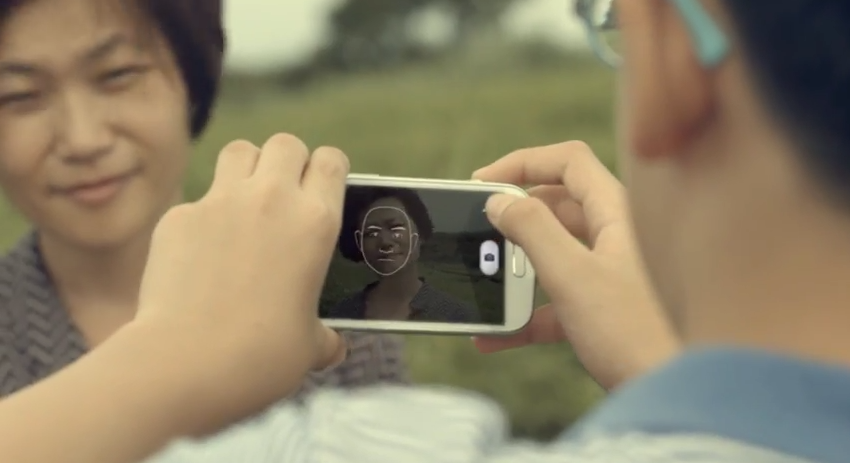
Samsung launches “Look at Me” app to help Canadian families living with autism

December 22, 2014 8:05am


Samsung Canada has teamed up with Autism Speaks Canada to develop an app called ‘Look At Me.’ An interactive camera app, it is designed for kids with autism to help improve eye contact, read facial expressions, and express emotions.
The app has different ‘missions’ and levels that are aimed to keep kids occupied by offering up points, various rewards, and visual or sound effects to keep children engaged. Samsung stated that the recommended time to use ‘Look at Me’ is 15-20 minutes each day.

‘Look at Me’ will be available starting December 23rd and is compatible with Samsung Galaxy Tab S, Note 2, Note 3, Note 4, Galaxy Tab 3, Galaxy Tab 4 and Galaxy Tab 5, and Zoom 1 devices.
Samsung Canada, as part of the Look At Me Project, is donating 200 GALAXY Tab S devices with the app preloaded to 200 Canadian families living with autism.