
Tuesday, September 27, 2011

Monday, September 26, 2011
Converse Aims To Break The Language Barrier
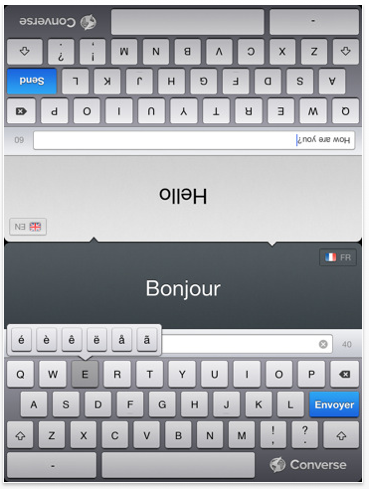

Converse ($4.99) by Riot converts text from one language to another.
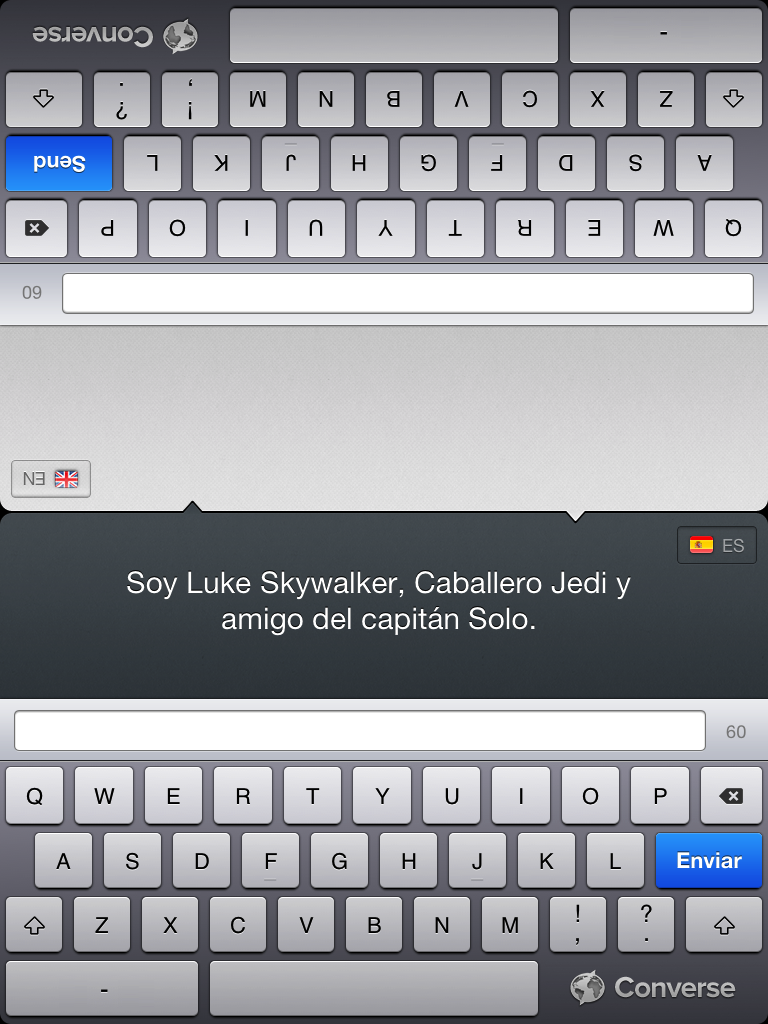
The app uses an Internet connection to translate between: English, French, Spanish, German, Italian, Portugese, and Dutch. The interface is about as simple as it gets. After the loading screen there is a single screen with two keyboards, each having a screen.
Select a language for each side. Typing a message on one side will translate it into the other side’s language. The field allows 60 characters for translation.
The ideal situation for using this app would be two monolingual people sitting across from each other at a table, with the iPad between them.

Life, however, is far from ideal, and the opportunities for using this app seem limited.
A better setup that I can see would be for those trying to learn a new language. The app could be a way to look up words or phrases in the other language, or as a quiz.
Added to the limited usefulness is the lack of user-friendliness.
Since the screen remains in portrait mode, the keyboards for both sides are smaller than if they were in landscape. A bluetooth keyboard isn’t a workaround, either.
Perhaps the biggest keyboard issue, though, is the functionality of the shift button. Don’t get me wrong, you can capitalize or select different punctuation; you just have to hold down the key each time you do it.
Obviously, physical keyboards require the shift button to be held, but this is iOS. Having the shift arrow turn blue is expected. At least you can hold down a letter to see variations for it.
This app could use some additional features, such as keeping a transcript, cut and paste functionality, and allowing for more than 60 characters. Oh, and a proper iOS shift key would be nice, too.
Related Posts

Everything You Need To Know About “Assistant” – For The iPhone 5

It has been a couple of months since 9to5Mac began teasing us with information on an unreleased “Assistant” feature for iOS that Apple is keeping warm for the launch of the iPhone 5. Born from Apple’s acquisition of Siri, the personal assistant app, and an alliance with Nuance, the new Assistant feature is rumored to be very similar, but built right into iOS and with more options. Today, in a well-timed post, 9to5Mac details what they claim is everything they know about it.
Essentially, the new assistant feature will be your own portable version of HAL. It will allow you to interact with your iPhone using your voice and some fancy waveforms on your screen. That is, similarly to Voice Control right now, you’ll be able to use a whole array of keywords and commands to interact with the core features of iOS. The exciting part about it is that your iPhone should be able to respond, and in a way, interact with you like an actual assistant. They point out the system’s ability to find GPS locations, and take you places (which might suggest a built-in GPS navigation app), as well as setting up appointments and reminders. It’s pretty much everything they have already said.
The complexity of the feature will require an iPhone 5 to take advantage of it. The device, they report, will feature Apple’s new dual-core A5 processor as well as, an entire 1GB of RAM. This will further allow for a much better experience with games, and browsing (your tabs will stay open longer).
Whether 9to5Mac is presenting us with actual insider information is questionable. Yet, the picture they paint looks credible enough, and sounds like an obvious evolution of the iPhone hardware, mixed with a couple of months of exciting discoveries from Apple’s developer tools. The hardware improvements, and especially an extended 1GB of RAM will be very beneficial, and really make your iPhone fly. As for “Assistant,” while I’m ready to believe it exists, it sounds very gimmicky at this stage. Without a doubt, it will take a lot of Apple magic to make it a compelling feature, especially knowing the current state of voice recognition engines.
Related Posts
- Nuance Dictation Referenced In iOS 5 – System Wide Dictation Feature, Activated By Keyboard?
- Apple To Reset iCloud Backup Data This Thursday As Public Launch Nears
- Top AppAdvice News And Apps Of The Past Week
- Personal Assistant, Speech-To-Text, Coming With iOS 5
- Apple Releases Updated iCloud Build To Developers As Expected Launch Nears
Intellipad iPad app focuses on special education needs
 Intellipad’s new Intellipad 1.0 iPad app is aimed at making Apple’s tablet more useful for special education students learning to read, write, and communicate.
Wednesday, August 24, 2011
Engineer hacks a Kindle, creates easy to use prototype for sister with cerebral palsy

This may not be Amazon's next version of the Kindle, but this rad mod does fill a very unique purpose. Glenn, an electrical engineer, created what he's calling the Frankenkindle for his sister, who has cerebral palsy. This e-reader features controls that are much easier for her to use than the stock buttons on the factory offering. Using the keypad from a children's reader and Amazon's pride and joy, the fully functional device is only lacking a permanent mount for the hacked digital library and some wire organization. In between the buttons and the Kindle, he's customized a Teensy USB microcontroller to interpret and pass along the proper input commands. While fully aware the device will need some user testing, Glenn intends to tailor this bad boy to his sister's specific needs -- and if that wasn't enough he's got more tricks up his sleeve that will help others with physical disabilities. If you're wanting a quick walk through, check out the video after the break.
Engineer hacks a Kindle, creates easy to use prototype for sister with cerebral palsy originally appeared on Engadget on Wed, 24 Aug 2011 07:58:00 EDT. Please see our terms for use of feeds.
Permalink Make |
  Breadboard Confessions | Email this | Comments
Monday, August 22, 2011
Tacit sonar gauntlet gives the blind ultrasonic eyes (video)

Sure, your Arduino project can make a stuffed monkey dance, but is it really doing anything for the greater benefit of mankind? Okay, maybe -- but not to the same degree as Grathio Labs' Tacit glove, an Arduino powered sonar device that can help the vision impaired navigate foreign environments. This wrist-mounted gauntlet is comprised of an Arduino microcontroller, a few ultrasonic sensors, and a pair of servomotors to apply variable pressure to the user's wrist to indicate their distance from an object or obstacle. Best of all, the gizmo's circuit and software are registered under Creative Commons, which means you're free to snag the plans from the source link below, and build your own. Go on, build one. Sure, it's a lot of work, but would you rather rock a wrist-mounted sonar gun, or don an ear-tugging bicycle helmet? Your choice.
Tacit sonar gauntlet gives the blind ultrasonic eyes (video) originally appeared on Engadget on Mon, 22 Aug 2011 07:15:00 EDT. Please see our terms for use of feeds.
PermalinkTechnabob | Grathio Labs | Email this | Comments