
Tuesday, December 13, 2011
Microsoft introduces OneNote for iPad, updates iPhone version
Microsoft introduces OneNote for iPad, updates iPhone version: 
Microsoft pushed out a native iPad version of the company's OneNote productivity app today along with enhancements to its existing iPhone counterpart. The popular note-taking utility allows users to create and edit documents on Apple's tablet, syncing them across devices via the cloud by way of Microsoft's SkyDrive. OneNote goes beyond simple text entry by offering checkboxes and bulleted items for easy composition of to-do lists, and photos can also be imported from the iOS camera roll to further personalize your work. A Windows Live ID is required to use the free-to-download app, though you'll only be able to create a total of 500 notes at no cost. An in-app purchase is required beyond that point, and is priced considerably higher on...

Friday, December 2, 2011
Trouble hearing? Advanced Bionics' waterproof implant is paddling your way

If you're one of the 200,000 deaf people who've received cochlear implants, then here's an upgrade worth considering: the Neptune from Advanced Bionics claims to be "the world's first and only swimmable, waterproof sound processor," and it's just received certification for the US and Canada. Read on for more details in the full press release and soon you could be bantering while you bathe.
Continue reading Trouble hearing? Advanced Bionics' waterproof implant is paddling your way
Braille-It Labeler brings low-cost printing, 'sightless construction' to the blind -- Engadget

The inventor tested his label maker at a workshop last year in Katpadi, India, where blind trainees successfully taught other visually impaired users how to create their very own Braille-It. Moallem is now looking to set up similar workshops across other locations, including Senegal, Liberia and Lebanon. The ultimate goal is to empower blind consumers to create their own low-cost and potentially life-saving tools -- particularly in developing countries, which account for an estimated 90 percent of the world's blind population. If successful, Moallem's invention and ensuing campaign could provide a remarkably simple solution for a large, yet often neglected population. We certainly wish him the best of luck. Find out more at the source link below, or check out Inhabitat's extensive coverage for more images and insight.Blind people cannot depend on mainstream commercial forces to advance the cause of Braille literacy. Nearly two centuries after the invention of Braille by a blind adolescent boy, the most widely used Braille-writing tools, the slate and stylus, are quite similar to the tools used by Louis Braille himself. In the hands of the sighted, the low-cost Braille industry has stagnated.
Link: Inhabitat.com
Tuesday, November 15, 2011
Dragon Express offers Lion users lower-cost speech-to-text
Dragon Express offers Lion users lower-cost speech-to-text:
Nuance released on Thursday a new speech-to-text app for Mac users called Dragon Express. The pared-down app features the same speech recognition engine as its full-featured, $199 cousin Dragon Dictate, but at a much lower price.
We have already reviewed Nuance's Dragon Dictate, which offers features like direct, in-app input, voice-based editing controls, voice commands to control you Mac, and more. Dragon Express is more akin to Dragon Dictation on iOS—activate the app (you can configure a hotkey), say something out loud, and your speech is converted to text. The text can then be sent to the clipboard and pasted into any other app. It can also be sent to any active text box in any currently running native Cocoa app.
Nuance said that Dragon Express can work with either your Mac's built-in mic or an optional USB headset. We haven't been able to test the app's accuracy without a headset just yet, but our experience with the iOS app suggests it should be good enough to at least give you a workable rough draft. If your typing speed isn't that great, or hampered by a repetitive-stress injury, Dragon Express could be a big help.
Dragon Express has a few more tricks up its sleeve, too. Using a limited selection of voice commands (or merely clicking the requisite icon on the app's toolbar), you can send the translated speech to Facebook, Twitter, in an e-mail, perform a Spotlight search on your Mac, or search online using Google.
Dragon Express only runs on Mac OS X Lion and is available now from the Mac App Store for an "introductory" price of $49.99.
Online Text to Speech Solutions for Corporate, Media and Public Web Sites
Online Text to Speech Solutions for Corporate, Media and Public Web Sites:
'via Blog this'
ReadSpeaker® Enterprise™ is a family of online text to speech solutions that speech-enable your website(s) for the benefit of people who would like to listen instead of (or as well as) read. Without the need for downloading and installing any additional programs it is available to all users and from anywhere. ReadSpeaker® Enterprise™ solutions are easy to implement and are used both in the public and private sectors worldwide.
ReadSpeaker® Enterprise™ is built with usability, accessibility and device independency in mind to provide maximum access not only from PCs but also from iPhones and other smartphones including BlackBerry and Android powered phones, iPads, MP3 playing devices, PDAs, Video game consoles, Interactive Internet TVs and Internet booths and kiosks.
'via Blog this'
Friday, October 21, 2011
An iOS 5 Tip: Using Your Camera Flash As An Indicator Light
An iOS 5 Tip: Using Your Camera Flash As An Indicator Light:



Were you aware that you could now use your iPhone’s camera flash as an indicator light? Of course you can and here’s how.
Note – This tip works on the iPhone 4 and iPhone 4S using iOS 5
First go into Accessibility using the Settings app (General > Accessibility). Next, select LED Flash for Alerts and simply turn it on.
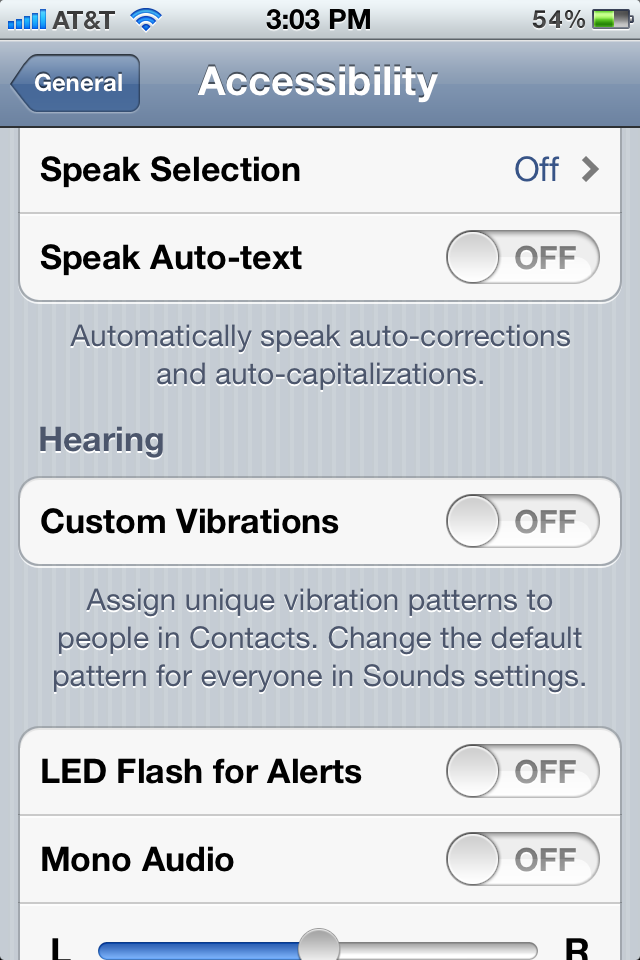
LED Setting
Now, whenever you receive a new alert, you’ll see your iPhone’s camera flash blinking as well.
THE APPADVICE APP IS FREE FOR A LIMITED TIME! (AND WE MEAN LIMITED!)
If you enjoyed this article, make sure to download the AppAdvice app. It brings you daily updates on the world of iOS, iPhone, iPad and jailbreak free of charge right to your iDevice - On the App Store now.
Related Posts
- Jailbreak Only: WinterBoard Is Now Fully Compatible With iOS 5
- Jailbreak Only: FavoriteContacts – Add Your Favorite Contacts To Notification Center
- Steve Jobs Wanted Dropbox – Instead We Got iCloud
- Jailbreak Only: Redsn0w Updated – Adds Windows Support, Makes Several Fixes
- Twitter CEO: Integration In iOS 5 Has Tripled Daily Twitter Sign-Ups
Subscribe to:
Posts (Atom)