Thursday, August 18, 2011

Bionic leg anticipates wearer's movements for more natural motion

Bionic leg anticipates wearer's movements for more natural motion:


Vanderbilt University researchers have debuted a new prosthetic leg that promises a more natural walking experience. Built-in sensors monitor the wearer's movement, data which is sent to a microprocessor, in order anticipate motion. The knee and ankle joints, meanwhile, work in unison, considerably cutting down on the sort of lag this is customary with more traditional prosthetic devices, a fact confirmed by tester Craig Hutto. The bionic limb, which took some seven years to develop, can increase the walking speed of its wearer by up to 25 percent, thanks to its need for considerably less energy from the user than passive prosthetic limbs. Check out a video of the leg in action at the source link below.

Bionic leg anticipates wearer's movements for more natural motion originally appeared on Engadget on Thu, 18 Aug 2011 12:27:00 EDT. Please see our terms for use of feeds.

Permalink PhysOrg  |  sourceVanderbilt  | Email this | Comments

Wednesday, August 17, 2011

Accessibility For Lion

Accessibility For Lion: "
OS X Lion

OS X LionToday Mac OS X 10.7, named Lion, became available to users. You can download Lion for just US$29 and Lion will run on most Intel-based Mac computers.


To check whether your computer will run Lion click on the Apple shaped icon at the top left of your screen, then choosing “About This Mac” from the menu. The information you need is in the line labelled “Processors”, and your Mac must have an Intel Core 2 Duo, Core i3, Core i5, Core i7, or Xeon processor to run Lion.


Remember to check the compatibility of ALL essential hardware and software before you decide to upgrade to Lion. Some programs and devices may not be compatible yet.

Lion is the first version of OS X which can be downloaded by users from the Mac App Store, which should save you a trip to the store or a shipping charge if your internet connection is good enough to cope. The download is about four gigabytes which could take several hours even on a fairly fast broadband connection. But if you can’t afford the time or money it would cost for you to download the upgrade, you can download Lion at Apple retail stores. Later this August, Lion will also be made available on a USB thumb drive through the Apple Stores.


So what’s new in Lion from an accessibility perspective? Apple’s web page listing new features in OS X Lion seems to list a lot of things which have actually been available to Snow Leopard users for a while now, but I’ll try to let you know which is which.


Note: I haven’t upgraded to Lion yet so I’m going by what’s on Apple’s web pages and documentation writing this article. I’d appreciate comments and feedback, especially if I’ve got things wrong!


OS X More Like iOS

This isn’t specifically listed on Apple’s page but it’s been observed my many people: OS X Lion on your Mac now behaves more like iOS does on the iPhone/iPad/iPod Touch. The two are far from identical but OS X now has more features that iOS has including: more multi-touch gestures, full screen apps, the app store, and ‘suspend’ for apps.

I think having the two systems becoming more similar is an overall win for accessibility because many of us use a Mac and an iPhone or iPad and the more similar they are the easier it is to learn and remember how to use them.


More Multi-Touch Gestures

Some multi-touch gestures, such as 2-finger scrolling, have been available for a while to Snow Leopard users with a laptop, Magic Trackpad or Magic Mouse. New gestures mimicing iOS gestures include tap-to-zoom (as in iOS’s Safari) and swipe-to-navigate (like how you turn pages in iBooks). OS X also has some new gestures not found in iOS including ways to switch between apps using just gestures.

The support page OS X Lion: About Multi-Touch Gestures lists the gestures with descriptions and pictures, or if you’ve already upgraded to Lion you can open the Trackpad and Mouse panes of System Preferences to see videos of each gesture.


Multi-touch gestures can be great for some people with limited movement but awful for others, depending on each person’s specific limitations. At the moment it looks like all of these functions can be triggered via the keyboard as well as via multi-touch so they can be also be customised to be triggered via on-screen keyboard, switch, etc. – that’s something that I’m sure accessibility teams will keep an eye on in the future!


Mac App Store

I believe that the Mac App store is definitely a win for accessibility – it makes it easy to search for access-related programs and takes the fiddlyness out of buying them. Not all Mac programs can be found via the Mac App store though which makes it significantly less useful than the iTunes App Store for iOS, but this should change over time

Versions and Auto Save

Auto Save is just what it sounds like – there’s no need to remember to “press save”, the Mac will do it for you. And Versions, a bit like Time Machine, will automatically save old versions of your documents and help you compare the old and new versions.

These will be an especial help to those with memory or attention problems, as well as saving all of us when our memory or attention spans fail.


VoiceOver and Braille Languages

OS X now comes with voices in many languages for VoiceOver users and braille tables for a wide variety of languages too. Previously OS X only shipped with text-to-speech voices in English and other languages had to be purchased at additional cost – it’s great to see this accessibility more widely available.

High Resolution Cursor

Previous OS X users who increased the cursor magnification, such as myself, will have been frustrated at how pixelated and “blocky” the cursor looked when its size was enlarged. Lion’s cursor finally fixes this problem!

Picture-In-Picture Zoom

Getting “lost” at high levels of zoom has always been a problem – it’s not always easy to keep track of which bit of the zoomed screen you’re viewing. The screen zoom feature in Lion offers a picture-in-picture view, allowing you to see the zoomed area in a separate window while keeping the rest of the screen at its native size. Choose to have the window follow the cursor, or keep the window in one place to show only areas you navigate.

Improved Auto-Correction

Another area where OS X and iOS are converging, auto-correction in Lion displays suggested spellings below the word. Press Return to accept the change or click the X to keep the current spelling.


There are lots more new features – you can check out Apple’s What’s New In OS X Lion page yourself.


A smoother cursor is a small thing but I think it’s the accessibility feature I’m looking forward to the most – that blocky cursor really has driven me crazy! The Picture-In-Picture zoom also has exciting potential because it’s something I could use a lot. What are you most looking forward to in OS X Lion?


- Ricky Buchanan


Some of the links in this article are affiliate links. This means that if you purchase the products that I've linked to I'll get a commission - a small percentage of the sale price. It won't cost you anything and it will help to support me and ATMac.


Related posts:

  1. Back To The Accessible Mac: Accessibility Implications From Apple’s 20 October Event’

  2. WWDC '10 Announcements: Accessibility Implications

  3. Leopard Accessibility Presentation Resources


Share This With A Friend


Do you know somebody else who would find this interesting or useful? Please forward it to them.


Did somebody forward this post to you? Visit ATMac and subscribe to receive these posts for free!


This article was originally published at Accessibility For Lion and is copyright (C) Ricky Buchanan 2010. May be forwarded but do not republish without permission.


"

New Case Could Make It Easier For Visually Impaired To Use iPad

New Case Could Make It Easier For Visually Impaired To Use iPad: "

New Case Could Make It Easier For Visually Impaired To Use iPad

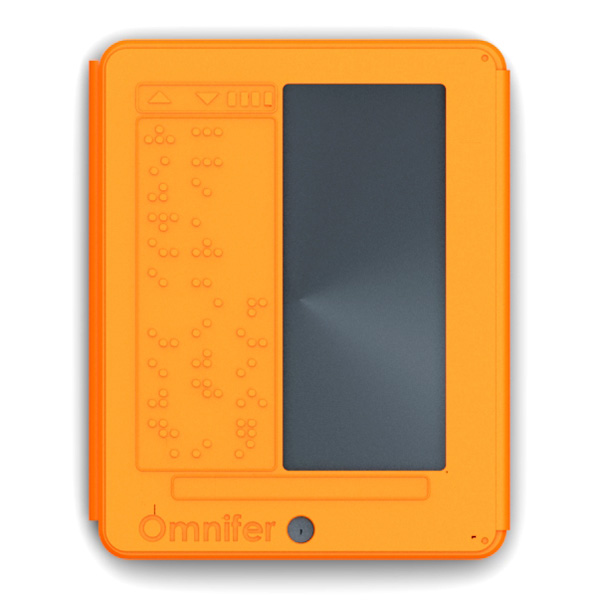
For the blind and those who are visually impaired, Jayson D’Alessandro has created the Omnifer iPad cover. Still only a concept, the case transforms the iPad’s flat surface into Braille, reflecting the contents of the page you are surfing.


According to a posting at Yanko Design, the Omnifer uses gas pockets filled with a chemical that reacts by expanding when exposed to light. This allows braille dots to rise, as necessary.


Omnifer Case For iPad

Omnifer Case For iPad


Naturally, in order for this to be successful, apps must be developed that interact with the case. In doing so, the app would automatically stream text into braille format to the user’s fingertips. As of now, the supporting technology is not yet available.


This is a brilliant concept. It would be terrific to see it implemented sometime in the future.


Random Posts

    "

    Tuesday, April 19, 2011

    Chipotle Ordered To Improve Accessibility

    A California man who uses a wheelchair appears to have succeeded in his effort to force Chipotle to alter the height of its counters in order to comply with the Americans with Disabilities Act, or ADA.

    Maurizio Antoninetti sued Chipotle Mexican Grill arguing that the fast-casual restaurant chain’s nearly 4-foot counters were too high for people using wheelchairs.

    Typically, customers at Chipotle select the food they want and watch as their tacos and burritos are assembled. But Antoninetti said the counter height prevented individuals with disabilities from participating in the restaurant experience.

    Chipotle said that it met the needs of customers with disabilities by bringing portions of each food to them to select from.

    However, a federal appeals court decision last year found in favor of Antoninetti saying that the counter “significantly reduced Antoninetti’s ability to enjoy the ‘Chipotle experience.’”

    Chipotle appealed the decision, but this week, the U.S. Supreme Court said it would not hear the case, allowing the lower court’s ruling to stand.

    Friday, April 8, 2011

    Getting An iPad/iPhone/iTouch For Communication

    Getting An iPad/iPhone/iTouch For Communication

    By Ricky Buchanan on April 8, 2011

    An iPadI frequently get emails from people who ask for an iPad, iPhone, or an iPod Touch for their family member who has a communication disorder. Having to say “no” to these worthy families really sucks and I haven’t had any decent list to point them at until now. So here’s a comprehensive list of groups that I know of who are currently accepting applications as of April 2011. Please read the notes at the bottom of the list, and use your common sense when contacting anybody or giving them your details.

    This list is for groups specifically distributing iPads, iPhones and iPod touches for communication purposes.

    Also please remember, iPads and iPhones and iTouches are great but they are not the right solution for everybody. If you are not already working with a speech pathologist (SLP) and perhaps an occupational therapist as well then the first thing you need to do is consult these people (if your child is at school then ask your special education department about this). A speech therapist can evaluate your child’s abilities and needs and can often organise trials of different devices for your child. Blindly spending a lot of money on an iPad – which might not be usable or helpful to your child – is a gamble which might backfire badly, so I definitely recommend that you consult the experts on this one.

    All information on this list comes from the program websites. I have not personally verified any of this information.
    iPad with Proloquo2Go

    iPads can be wonderful communication tool

    The blog Apps 4 Children With Special Needs is giving an iPad away to a family in need every time $500 is raised.
    Who can apply: No information specified
    Program’s history: One iPad distributed (March 2011), published waiting list lists 50+ people.
    Program location: Location unknown
    Further information: iPads 4U

    Babies with iPads is granting iPads as funds allow.
    Who can apply: Applicants must be residents of western virginia, USA, with a child under 60 months old. Further details on website.
    Program’s history: One iPad distributed
    Program location: Western Virginia, USA
    Further information: Babies with iPads grant application eligibility requirements

    The Conover Company is a software development company, focussing on assessment and training software for both companies and the educational area. One of their product areas is iPhone and iPad apps for special education, including life skills, literacy skills, social skills and work skills. The company has established the Conover Mobile Technology Grant to promote the use of mobile technology and Conover Company apps to improve individuals’ ability to function independently in their homes, schools, workplaces and communities
    Who can apply: Website specifies “Individuals, parents, caretakers, teachers, counselors, religious leaders, private organizations and public organizations.” Application form implies but doesn’t specify that applicants are USA-based.
    Program’s history: No history known
    Program location: Wisconsin, USA
    Further information: Conover Mobile Technology Grant

    Danny’s Wish is committed to providing life enhancing resources and experiences for children and families dealing with autism and autism spectrum disorders. Their goal for this campaign is to raise $50,000 to supply approximately 100 iPads to those children affected and in need the most.
    Who can apply: Recipient must be a USA resident with an official autism spectrum diagnosis and be nonverbal or minimally verbal. Gross income of family below US$100k.
    Program’s history: No history known
    Program location: New York, USA
    Further information: Danny’s Wish

    The HollyRod Foundation introduced the “Give the Gift of Voice” campaign in 2010 to provide iPads to give a voice to those without. To date, HollyRod has given away more iPads for communication for Autism than any other organization. Over 100 individuals ranging in age from 3 to 32 across 27 states can now make their voice heard. It is our commitment to continue this program so that every individual with Autism has a voice.
    Who can apply: Not currently accepting applications
    Program location: USA
    Program’s history: Over 100 iPads distributed
    Further information: The HollyRod Foundation

    iHelp for Special Needs is dedicated to help raise funds for children with special needs to receive iPads and relevant apps to assist with communication, life skills, and social skills. The group helps parents and groups to raise funds for themselves, and supplements these funds.
    Who can apply: No information specified
    Program location: Texas, USA
    Program’s history: One iPad distributed (December 2010)
    Further information: iHelp for Special Needs

    iPads4irishautism (previously “I Want My iPhone For Autism”) refurbish and redistribute used iPads, iPhones and iPod Touches. This program is run by Lisa Domican, who also develops the Grace AAC app.
    Who can apply: No information specified
    Program’s history: No history known
    Program location: Ireland
    Further information: iPads4irishautism

    The iTaalk Autism Foundation refurbishes used iPhones and similar devices and distributes these to children with Autism.
    Who can apply: No information specified
    Program’s history: No history known
    Program location: Ohio, USA
    Further information: iTaalk Autism Foundation

    The Puzzling Piece are running an iPad challenge. You sell 60 pieces of their puzzle-piece autism jewellery (at US$20 each) and they will send you a brand new iPad. The Puzzling Piece is run by a couple who have an autistic son.
    Who can apply: Site implies parents and teachers, but no limits specified
    Program’s history: No history known
    Program location: Florida, USA
    Further information: The Puzzling Piece iPad Challenge

    Small Steps In Speech has a mission to help children with speech and/or language disorders take the steps needed to be better communicators. This is achieved through grants and donations to service providers and qualifying charitable organisations.
    Who can apply: Applicant must be USA based and under 22 years of age.
    Program’s history: No history known
    Program location: New Jersey, USA
    Further information: Small Steps In Speech Grant Application

    All information on this list comes from the program websites. I have not personally verified any of this information – that’s up to you.

    Note that Apple themselves do not donate devices to anybody, to the best of my knowledge, and are very unlikely to start doing so.

    I think that if you need a device for somebody and can’t afford it, your best bet is probably not to apply to these sites – their waiting lists are already very long. In my opinion, you’re most likely to have luck with raising money on your own – suggestions on Squidilicious’ How To Get Your Kid With Autism That Wonderful iPad and On A Tight Budget: 7 Ways To Get An iPad For Your Child With Special Needs.

    If you have further information please leave me a comment.

    - Ricky Buchanan

    Posted in , , , , | Leave a response

    Getting An iPad/iPhone/iTouch For Communication